Autos Baby Beauty Books Computers Education Electronics Health Home & Garden Local Places Movies Pets Travel Web Sites more…
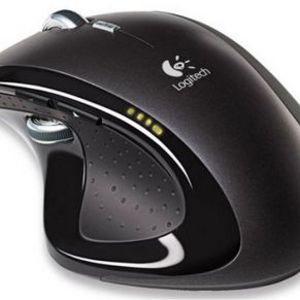
Logitech MX Revolution Mouse

Logitech MX Revolution Mouse Review


Overall 4.71 of 5 view all 14 reviews


Solid mouse with few drawbacks
4 star rating

married, into trying new things, Every day computer user, impressed with this product, willing to pay for quality, a home owner, value conscious, a pet owner
show all »
Pros

    Highly configurable, Solid feel, Major improvement over past models, Flawless Tracking, Good battery life, Works with Windows and OSX, Thumbwheel, Trusted Brand, Side scrolling, Free spin is extremely useful

Cons
    Cost, Not bluetooth, needs dongle, Not configurable in Linux, no external battery

NOV
13
2007
I bought this mouse to get OSX support, which the MX1000 did not have. I have been very happy with it for almost a year now. Here are some points that helped me make the decision to make an expensive purchase.

I have big hands, many mice just don't feel too terribly comfortable to me. The design is rather sexy, as mice go. Many of the designs of today are unattractive and that unattractiveness leads to uncomfortable mousing. After upgrading to OSX, I found that having a mouse that didn't use all of the available features was extremely frustrating and that was #1 in my book. The MX1000 used external batteries, which was nice since you could replace the battery if it were to die. This model has a built in battery. It makes for more convenient use, but on the same token, it would make many people hesitant to buy it.

Logitech has been making quality input devices for years and I have been happy, more than happy, with every product I have used from them. This mouse is no exception. I would like to point out some of the more important features of this mouse. The free scrolling feature is fantastic. If you surf the internet, you can set the mouse wheel to spin without clicks. The mouse wheel is weighted, like a gyroscope, which gives you the ability to spin the wheel vigorously. A flick of the finger and the mouse scrolls down the page at lightning speed. You can also turn on click locking, which adds the little clicks as you scroll. The thumbwheel can be setup for many, many different options. The default settings are quick scrolling. If you pull the thumbwheel down, it will scroll blazingly fast down the page you are on, making the free scroll a moot point (if you have it configured as such). On OSX, I have the thumbwheel set to perform task switching, similar to Windows XP/Vista "alt+tab".

There are few downsides to this product. One, the cost. If you cannot justify spending over $50 on a mouse, forget this one. You can find it with rebates that make it less than $75, but they are few and far between. Also, the dongle. I was hoping for a bluetooth mouse, which didn't need any external connectors, making it truly portable without hassle. The bluetooth mice available at the time when I purchased this mouse were sparse.

If you like a weighty mouse with good quality, good tracking and support for multiple operating systems, this is the mouse for you.

Last edited on Nov 30, 2007


I_thumb_up Logitech MX Revolution Mouse is recommended by mpoirier


D
Did you find this review helpful?
Review inappropriate?


I_comment_shdw24 Comments about mpoirier’s Review