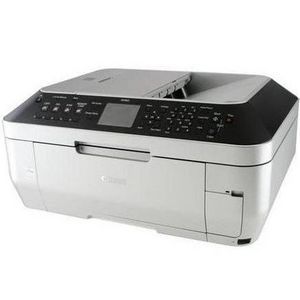
Canon PIXMA Wireless Office All-in-One Printer MX860 Reviews

Brand:
Canon #2 all-in-one printers brand
16
Score:
94/100
Other All-In-One Printers:
  • Average: 78
  • High: 100
Based on: 23 reviews
Review it

Reviews (23)

What people are saying about Canon PIXMA Wireless Office All-in-One Printer MX860

1 of 2
  • 6 reviews
  • 1,205 reads
  • Last updated: 02/15/2012

The Canon Pixma MX860 is great for scanning & printing pictures!

Overall
Rated 5 out of 5

I use my MX860 to scan and print pictures and they turn out better than the original. I also use it for down loading and printing my daughter's school work. Do your children ever complain about school being too hard to understand? Why don't you consider homeschooling them? They will excel in school and won't hate doing it anymore because you can teach them at home in 2 hours or less and have fun doing it. There are a lot of homeschoolers now because schools are closing down, classes are getting crowded and kids are not being given the education they deserve. I know you love your kids and want the best for them so instead of spending time after work helping them with their homework, why not homeschool them instead. I have homeschooled my daughter since kindergarden, she skipped 4th and is now in 7th grade and 10 yrs old. Think about it and if you are interested google it for help and your states' rules on it. Happy Teaching!

  • 7 reviews
  • 2,175 reads
  • Last updated: 02/15/2012

The Best Printer!

Overall
Rated 5 out of 5

The Canon MX860 is a very great printer for anyone who has a wireless router and a family. Its extremely and very easy to operate. Even for a 6 year old. With this printer there is WIFI printing. So it is great if you have a laptop with WIFI capabilities. My son uses it everyday to copy his homework and use it for his projects. Whats great about this printer is that each ink has it's own cartilage, and its see through so you can know how much ink is left. So if you would like to refill this ink cartage, you can know how much to put. There is a screen on the printer. The features on this printer is Copying, Printing, Faxing, and Scanning. The Price Is Extremely Low depending where you would buy it. (I bought mine at Costco for like $130) Just to let you know, this printer is on Consumer Reports Best All- In-One Printers (#15) Well, all in all this printer is an extremely great printer for all families!

  • 9 reviews
  • 2,158 reads
  • Last updated: 02/15/2012

Love it!!

Overall
Rated 5 out of 5

The Canon MX860 is just what every household needs. It is a stylish, quiet, trustworthy, and durable printer, scanner, and copier. I think it is a great size for a home office printer. This machine is perfect for one that is used frequently. In my opinion, the printer offers a high quality result for the price, you won't be disappointed. I have used this machine for all of its purposes and have never had a problem. In my experience the product works quickly and effectively. The PC interaction is great and the machine connects very easily to my home wireless network. The paper stores nicely in a drawer under the printer, and although the printer doesn't hold a ton of paper at once, I think it is perfect for home office use. In printing color, I have also been impressed with the color quality result. Due to it's effective functionality and quality results, I would highly recommend this printer for home office use! 

  • 12 reviews
  • 1,292 reads
  • Last updated: 02/15/2012

Good, Reliable Printer (for the most part)

Overall
Rated 4 out of 5

I bought this printer for general use at home.  I didn't need it to print out anything with professional quality or anything.  One of the reasons I picked this printer is because it was an all in one printer.  It has a fax, scanner and port for your camera storage to download photos. 

The fax has worked perfectly and the scanner has decent quality.  My only complaint has to do with the ink.  Number one, it is hard for me to find a place that will do Canon ink refills as I do not want to spend the money to buy brand new ink cartridges every time.  Also, periodically you must clean the area where you put the cartridges because it gets clogged and then the printer won't recognize it.

Overall, this printer is not GREAT at one thing, it is good at many things which is what I was looking for so it fit the bill. I have had it one year so far and it seems as though it could last another year.

  • 8 reviews
  • 498 reads
  • Last updated: 02/15/2012

Canon MX860 is great!

Overall
Rated 4 out of 5

As an at-home printer, the Canon MX860 does a great job. I've had this printer for a year now and I've never had the printer jam. It prints clearly and is smart about pulling only one piece of paper at a time. I've used this to print my baby announcements and envelopes with no problem. I've scanned, copied, and utilized the wireless features. LOVE IT! Everything it does it terrific and I love the duplex copying and printing. That being said, there were some cons as well. 1) It took me FOREVER to get it set up. The directions were very confusing and ultimately I ended up completely screwing up my wireless router so that it no longer worked. Once I bought a new wireless router, it was okay. I'...

Read the complete review
  • 1 review
  • 445 reads
  • Last updated: 02/15/2012

Canon MX860 is a MUST have Printer

Overall
Rated 5 out of 5

Pros: Acceptable printing speed. Good and fast draft prints and copies. Quiet operation. Text quality is nearly laser sharp. Very good photo quality. Duplex printing and copying. Software that works well, unlike HP.

Cons: Can NOT produce proper COPY of documents with margins less than 0.25 inches. Borderless copy doesn't help. Can't print from USB keys. Poorly designed USB slot barely fits average USB key. No document preview on copy and scan on the LCD like HP has.

Summary: Let me start with the bad. I've been bugging Canon support for the past several days because I discovered a big flaw in the COPY feature of the printer. MX860 is utterly incapable of producing a copy of the...

Read the complete review
  • 22 reviews
  • 4,989 reads
  • Last updated: 02/15/2012

Superior

Overall
Rated 5 out of 5

I bought this Canon model after my Lexmark Inkjet refused to feed paper through anymore.  I wanted something smaller for our small business that included everything (fax, printer, scan, copier).  I settled on this one after hearing some good reviews about it.  It was the best decision by way of 4-in-one printers. 

This printer is reliable and does and incredible job with every day printing as well as picture printing.  Never a problem with scanning and other than reading the directions to help with connecting wirelessly, I didn't need the instructions to figure out how to run any programs.  The installation process is a snap.

If you are a big business, I do not recommend it.  It tends to be on the slow side and a little noisy.  This machine can be made to be quieter, however, that slows down the "warming up" process as a result.  I do not require multiple copies of large documents to be printed off, therefore this printer does the job consistently.

  • 1 review
  • 191 reads
  • Last updated: 02/15/2012

Great Features but expensive ink

Overall
Rated 4 out of 5

I was looking for a wireless all in one printer that could install to my network.  It was fairly easy to setup on both XP and windows 7.  I did not upgrade correctly so I had to start from scratch after I upgraded to Windows 7.  Since it is wireless, there is a delay when printing large docs, but I've never lost connection.  I use the scanner pretty often and have had no problems.  It also has a built-in fax machine I use for sending faxes.  Overall, I'm satisfied with the device.  It is a little expensive to replace all of the ink, and the cartridges are pretty small. 

Features: Automatic scanning, dual paper loading options, fax, color coping, wireless, or wired options. Also has 5 in 1 memory card readers.

Disadvantage's: Sometime hard to load paper in bottom drawer, and the drawer is small.  Setting menu is a little hard to navigate, print cartridges are small and expensive to replace.  $60 to $70 for all 6 last time I needed to purchase from Sams Club.

  • 17 reviews
  • 7,645 reads
  • Last updated: 02/15/2012

for all your needs!

Overall
Rated 5 out of 5

This is by far the most expensive printer that I have ever had. But definitely happy with my investment. As the name implies, this is an all in one printer, with copier, fax, and printing services. I got this close to $250 when it first came out. I was able to connect this printer to the network and all our Windows computers were able to recognize it right away, I don't know about any other Windows version. This can print over the network, or through a USB. This printer is big and heavy compares to other printers designed for household use. I bought this for work so if you are looking to use it at home, I'd suggest other cheaper printer, unless you have the need for it. The printing quality is great, both color and black and white. I have tried printing pictures, it came out ok and acceptable. Again, this is by far the best printer I have had so the was pretty impressed with the quality. This printer also supports wireless so that's a big plus for me.

  • 10 reviews
  • 3,530 reads
  • Last updated: 02/15/2012

Best All-In-One InkJet I've ever had

Overall
Rated 4 out of 5

I purchased the Canon MX860 after my old Dell all-in-one scanned and printed it's last paper of its life.  Its massive size was one of the first things I noticed about this grey beast.  Even though the Canon MX860 is large, it's a pretty nice looking and modern all-in-one.  I was very happy with how easily it was able to connect with my wireless network.  It was also very nice how it had a USB and flash memory port directly on the printer.  The scan quality seemed excellent along witht he print quality.  My one complaint about the Canon MX860 is the ability to for the software associated with it to work on a 64 Bit system.  The reason I didn't give this pro...

Read the complete review
  • 4 reviews
  • 164 reads
  • Last updated: 02/15/2012

Works great for Mac and PC

Overall
Rated 5 out of 5

I got this recently for a great price and was excited to set it up. Initially this printer has a HUGE footprint. Setting up was not too bad but took some time to get it to work correctly with both the Mac and PC side. It was a little frustrating because sometimes it would not actually connect to the network I set up in my home. After looking up this problem, I found others were experiencing the same thing. So as recommended, I downloaded the latest drivers, uninstalled everything, and reinstalled. It works great now.

I love how you can print double sided, scan via the feeder or flat bed and be able to print until the ink cartridge is completely empty. Even though it says no ink, you can still print. No ink wasted here.

  • 12 reviews
  • 4,312 reads
  • Last updated: 02/15/2012

The Canon MX860 is mainly one thing: trustworthy

Overall
Rated 5 out of 5

After moving into my new house, one thing we needed was a printer. We weren't looking for any specific one, but mainly, a trustworthy one. I was tired of having problems with my previous printer, like stop printing for no reason, being impossible to configurate or anything like it.

We were really happy with the Canon brand since he bought a camera from them. The camera is really good, and everytime we needed, the customer service was awesome.

We decided to check on the Canon printer, and, since I am a graphic designer, I needed something with good resolution, not much speed. This printer gave it all: is fast, reliable, and easy to use.

First of all, it was really easy to install it. We co...

Read the complete review
  • 13 reviews
  • 2,502 reads
  • Last updated: 02/15/2012

The Canon MX860 is a great all-in-one printer.

Overall
Rated 4 out of 5

The Canon MX860 is a color inkjet all-in-one printer.  I've never had an all-in-one printer before, but now that I do, I wouldn't be able to survive without it.  This printer not only provides excellent quality prints in color or black-and-white, but it also has the capability to act as a fax, scanner, and copier.

The MX860 has full wireless capability and a built-in print server.  That means that it can stand completely alone or it can be wired to your router in order to communicate through wi-fi with your laptop.

The print quality is excellent.  I've used it to print both text, graphics, and photos.  The resolution is relatively high and the color balance produce...

Read the complete review
  • 18 reviews
  • 7,225 reads
  • Last updated: 02/15/2012

very fast!

Overall
Rated 5 out of 5

This is a great all-in-one printer, and very fast printing. I have been very happy with it since I got it, and have yet to explore all its functionalities. This is an expensive printer however, I wouldn't recommend it if you don't have the need to use it all the time. As the name suggests, it can copy, print, and fax. It can be hooked up wirelessly, but does not support wireless-N. All my windows 7 machines were able to recognize this printer right away, no need to use the driver from the cd or web. If you need more functionalities, like testing the printer, copy to desktop etc, you'll need the driver software from canon. It has a LCD screen on the printer, which isn't that much helpful sinc...

Read the complete review
  • 1 review
  • 122 reads
  • Last updated: 02/15/2012

Canon PIXMA MX860 All-In-One InkJet Printer is simply amazing!!

Overall
Rated 5 out of 5

After our last printer got ruined by our cat playing with a toy that it had lodged inside where the ink was we decided to find one that was not only cat proof, but user friendly. This was very easy to install we did the wireless install instead of the cable install. We love the idea that it has everything we need in one nice handy package. I have found that the print quality is great for printing photos of my grand-kids and sent them to my father, who thought the photos were printed in photo lab. You can also use a memorycard to print from if you want, that is pretty handy I think.The ink is in individual tanks, so if one color runs out you only have to purchase that one color. So that has already saved me some money on the ink. We have only used the scanner a couple times and it is more than adequate for our use. The fax is very easy to use. I would highly reccomend this great all in one printer!

1 of 2